Nightwing AI video examples
Explore Nightwing AI video examples with their source models, native settings and practical creation notes. Make your own version in the studio.
Make the move
your own.
One dance. Entirely different worlds.
Real generated examples, ready to explore.
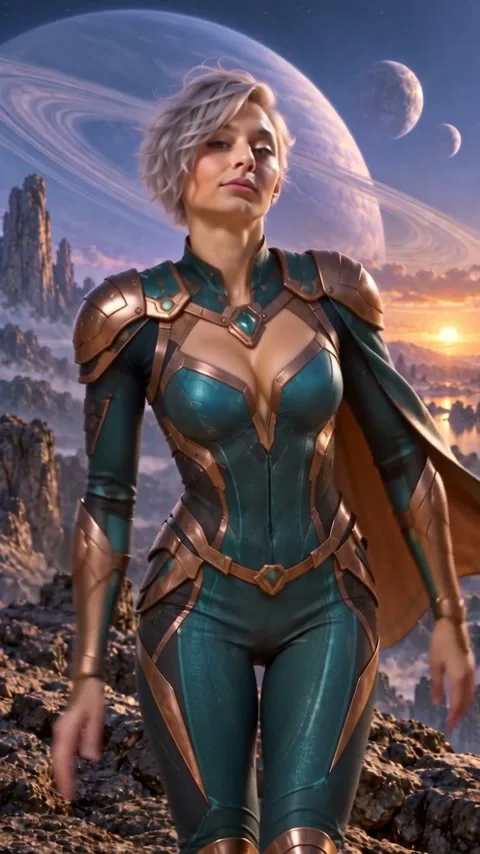
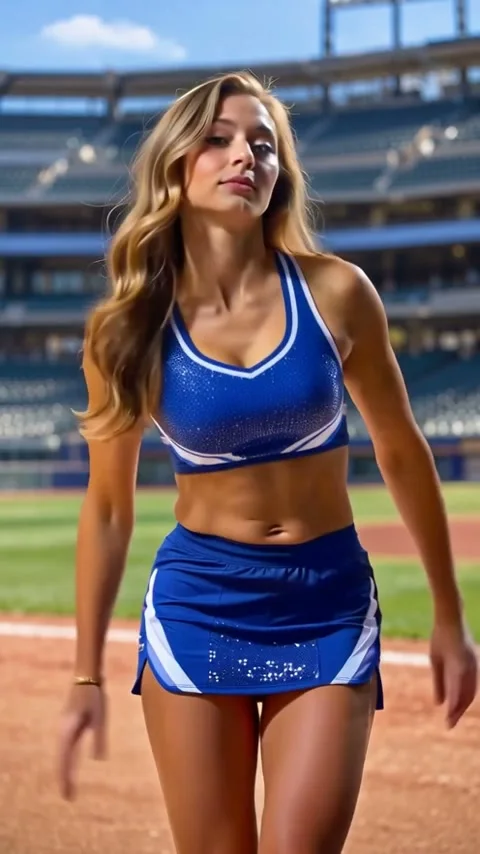
These two examples were generated in the source project with Seedance 2.5. They demonstrate possible results, not a guarantee of identical motion or likeness. The template uses the stadium clip; the space scene is a separate creative interpretation.
What these Nightwing AI video examples show
Start by watching the performer, then watch the camera and background. The stadium example follows one adult dancer in blue-and-white sportswear. The space interpretation changes the subject and setting to an original silver-haired heroine. Both clips demonstrate the Nightwing dance format, but the template uses the stadium clip as its motion source. Choosing the space example does not silently replace that fixed source.
These are actual generated clips from the reference project. They are not simulated players or concept illustrations. Each source was reviewed against its recorded settings and file hash. The available original files are approximately 8.064 seconds, vertical 9:16 and native 480p. A small-screen preview may use a lighter derivative; play the original to inspect the full available file. Enlarging the player does not turn the original into HD footage.
Choose a subject and a workflow
For a recognizable performer, use a clear appearance description or a photo you have permission to upload. Describe one adult subject, a coherent outfit and the visual details that matter. Photos with consistent lighting and an unobstructed face give a clearer brief than several contradictory views. An image can guide appearance; it is not a guarantee that every frame will preserve an exact identity.
Open Normal when you want editable scene direction and model controls. Text to video starts from your description. Image to video uses a supported first-frame or image role. Multi-reference exposes the image, video and audio roles supported by the chosen model. The Nightwing Template supplies fixed server-side instructions and the reviewed stadium motion, while your subject field describes the replacement performer. Review the selected mode before submitting.
Read the settings before comparing results
A model name alone is not enough for a fair comparison. Check duration, resolution, aspect ratio, native audio and reference inputs. The source examples use Seedance 2.5 at 480p. Other model pages describe their own contracts and controls. A model with text and image inputs may not support video references, and a setting offered by one model should not be assumed to work on another.
The approximately eight-second Nightwing Template is a different configuration from the single-video pass, which covers a compatible fifteen-second 720p request. Use the live credit quote for this template. It includes the applicable output settings and 8.064 reference-video seconds. Do not estimate its price by taking the cost of a different model, dividing a pass price by duration, or assuming the reference input is free.
Review movement, identity and sound
Watch the whole take before choosing a still frame to share. Look for consistent facial features, natural hands and feet, readable choreography and a stable relationship between the performer and the background. Pay attention to turns, overlapping limbs and fast transitions. A convincing opening frame can still lead to an inconsistent ending. Results may need another separately quoted take.
The demonstration clips use original generated rhythm and ambience. They do not include an existing song or a licensed recording from another video. If you add music later, use audio you are allowed to publish. Nightwing AI is an independent creation tool and has no affiliation with DC or the rights holder of any comic character. Use original characters and authorized likenesses for your own work.
Keep the strongest take
After generation, open the completed video and check both playback and the download. Private generated results have a 24-hour retention window, so save the files you want to keep before expiry. Public curated examples are a separate library and do not extend the lifetime of a private result. A submitted task or a browser redirect is not itself a completed video.
A confirmed technical failure releases reserved credits or restores the original unused pass once. An uncertain submission stays under reconciliation to avoid a duplicate paid call. A cash refund is a separate process under the published refund policy. Keep your order reference and generation reference when contacting support; never include full card details or account credentials.